Video & Text Assessment Tool for Modern Hiring
Learn how VideoPitcher's customizable video and text questionnaires help HR teams screen candidates efficiently, with 20 free credits to start and pricing from ₹25 per assessment.
Screen candidates with smart video and text questionnaires before the interview. Get 20 Free Credits. ₹25/assessment (India) or $0.50/assessment (International). Try VideoPitcher today.
Hiring shouldn't start with a 30-minute call just to realize someone isn't the right fit. Every HR professional knows the frustration: you've scheduled back-to-back phone screens, only to discover within the first five minutes that half the candidates don't meet basic requirements. The traditional hiring process wastes countless hours on unqualified applicants, leaving recruiters burned out and top talent slipping through the cracks.
VideoPitcher transforms this broken workflow by letting you screen candidates before the interview through smart, customizable video and text questionnaires. Instead of scheduling dozens of calls, you create a session with questions that matter to your role, share it with candidates, and review all submissions in your admin dashboard—anytime, anywhere. With 20 free credits to start and pricing at just ₹25 per assessment in India or $0.50 internationally, it's the most affordable way to upgrade your hiring process without breaking the budget.
How VideoPitcher Works: A Deep Dive into the Create-Share-Review Workflow
Step 1: Create a highly customized session. This isn't just about picking questions from a list; it's about architecting a candidate experience that reflects your company's values. Whether you're hiring for high-growth tech roles, customer-facing sales positions, or specialized operational functions, you can design sessions that evaluate technical depth, soft skills, and cultural alignment simultaneously. The platform's flexibility allows for unlimited questions, ensuring you capture every necessary detail before the first live interaction.
Step 2: Intelligent Response Configuration. Choose between text-based answers for quick qualification or video-based responses for deeper insight. Text responses are ideal for verifying logistical requirements—salary expectations, notice periods, or relocation status—while video answers allow you to see the professional presence and articulation skills of candidates. You can even set specific time limits for video recordings, forcing candidates to be concise and focused in their delivery, which is itself a critical skill in most modern workplaces.
Step 3: Strategic Link Distribution. Once your session is ready, the distribution strategy becomes paramount. You can generate private links for targeted outreach to top-tier sourced talent, or public links to cast a wide net across job boards and social media. This flexibility ensures that whether you're managing a niche executive search or a high-volume campus recruitment drive, your screening pipeline remains efficient and under your control.
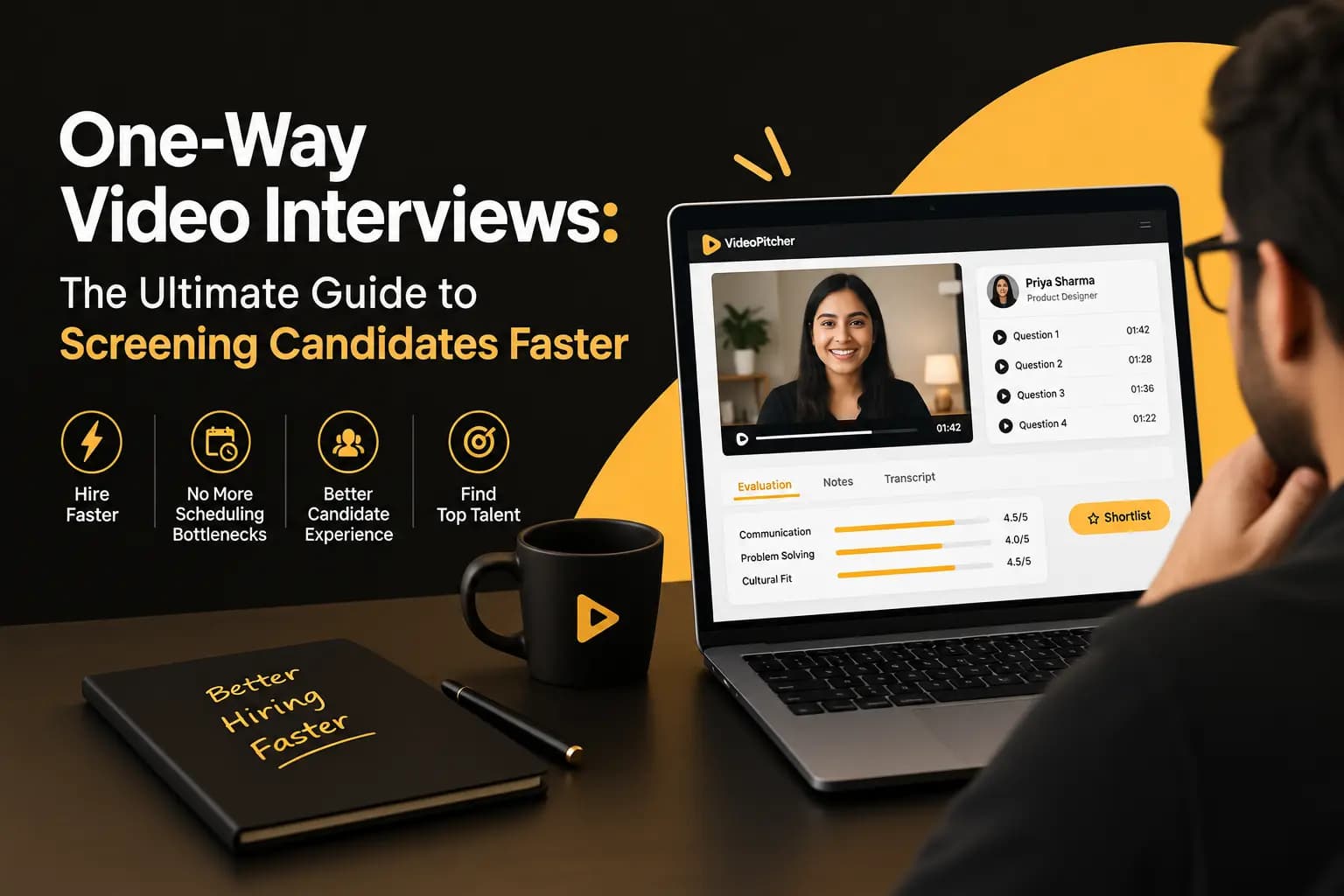
Step 4: Collaborative Dashboard Review. The review process is where the real time-savings happen. Instead of being tied to a fixed schedule, your hiring team can review submissions at their own pace. The admin dashboard organizes every response, video, and candidate detail in a clean, unified interface. You can jump directly to specific questions, compare how different candidates handled the same challenge, and leave internal notes for your colleagues. This asynchronous model effectively de-clutters your calendar and ensures that only the top 10% of applicants ever reach the live interview stage.
The ROI of Pre-Interview Screening: Why Affordable Assessments Pay for Themselves
In the recruitment world, 'Time to Hire' and 'Cost per Hire' are the metrics that define success. However, many teams overlook the 'Cost of Screening.' When a senior recruiter or hiring manager spends 20 hours a week on introductory phone calls, that's time taken away from high-value strategic work. By implementing VideoPitcher, you can reduce live screening time by up to 80%. If your team conducts 50 phone screens a month, each taking 30 minutes, that's 25 hours of work. With automated video assessments, that same volume can be reviewed in under 4 hours.
Let's look at the hard numbers. At pricing as low as ₹25 per assessment in India or $0.50 internationally, the financial investment is negligible compared to the salary of an HR professional. Even if you assess 100 candidates to find one perfect hire, your total platform cost is just ₹2,500. Compare this to the thousands spent on job board postings, LinkedIn Premium, or external agency fees. VideoPitcher isn't just an expense; it's a multiplier that makes all your other recruitment investments more efficient by ensuring you only focus your most expensive resources—your people's time—on the most promising candidates.
Beyond direct time savings, consider the 'Cost of a Bad Hire.' Industry data suggest that replacing an employee costs between 6 and 9 months' salary on average. Much of this risk comes from 'false positives' in the interview process—candidates who look great on paper and can charm their way through a single interview but lack the day-to-day communication skills or technical depth required for the role. Pre-hire video assessments provide a more authentic, multi-dimensional view of a candidate early on, allowing you to spot red flags before they ever enter your office.
Finally, the 'Speed to Offer' advantage cannot be overstated. In a candidate-driven market, the best talent is often off the market within 10 days. Traditional hiring processes with multiple rounds of live interviews can easily take 3 to 4 weeks. By front-loading the evaluation with VideoPitcher, you can move from application to final offer in less than half that time. This speed doesn't just improve your hit rate; it projects an image of a decisive, modern, and high-performance organization that elite talent wants to join.
Public vs Private Assessment Links: Precision Scaling for Every Pipeline
Public assessment links are a game-changer for high-volume recruitment. By posting a link on LinkedIn, Indeed, or your company careers page, you enable 'self-service screening.' Any candidate who is genuinely interested in the role can immediately demonstrate their skills. This naturally filters out the 'easy apply' spam that plagues modern job boards. People who won't spend 10 minutes answering role-specific questions are unlikely to be the high-performers you need. Public links ensure your pipeline is filled with engaged, proactive applicants from day one.
Private assessment links offer a more surgical approach for strategic or sensitive hires. When your sourcing team finds a passive candidate on GitHub or Behance, a generic application process can be a turn-off. Instead, send them a personalized private link: 'We loved your recent project; we'd like to fast-track your application through this brief 3-question video intro.' This feels like an exclusive invitation rather than a hurdle, significantly increasing response rates from high-demand talent and internal referrals who expect a more curated experience.
The hybrid approach is often the most effective. Many successful HR teams use public links for their first-round wide-net screening, then move the top-tier candidates into a second-round 'Deep Dive' assessment using a private link with more technical or situational questions. This tiered structure allows you to maintain a high-volume top-of-funnel while ensuring that the deepest evaluation is reserved for those who have already proven their baseline competence. It's about building a funnel that is both wide at the top and rigorous in the middle.
UTM tracking and source attribution further enhance the utility of these links. By using different public links for different platforms (one for LinkedIn, one for your internal blog, one for a specific recruitment agency), you can track which sources are providing the highest-quality candidates. If your 'LinkedIn link' is producing a 10% shortlist rate while your 'Blog link' is producing a 40% rate, you have the data you need to optimize your recruitment marketing budget and focus your efforts where they yield the best results.
Enhancing Technical Hiring: Beyond the Portfolio and Git Profile
For technical roles, a resume or a LinkedIn profile provides a very narrow slice of a candidate's reality. You see 'What' they've done, but you don't see 'How' they think. VideoPitcher allows you to ask technical candidates to explain their logic. Instead of just a coding test, ask them to 'Walk us through how you'd scale a distributed system' or 'Explain the trade-offs between two specific architectural patterns.' The way a developer articulates a technical concept is one of the most accurate predictors of their ability to work in a collaborative, senior-level environment.
This 'Architecture Walkthrough' style of assessment is particularly effective for remote teams. In a distributed environment, written and verbal communication is just as important as the code itself. If a candidate can't explain their logic clearly on video, they are likely to struggle in async Slack-based or Zoom-based collaborations. By screening for these communication skills early, you avoid the common trap of hiring a 'brilliant jerk' or a developer who is technically gifted but impossible to work with effectively.
Furthermore, video assessments can act as a more humane alternative to 'live coding' environments, which are notorious for inducing performance anxiety. By allowing candidates to record their responses in their own time and from their own workspace, you see them at their most authentic. They can gather their thoughts, research a specific point if needed, and deliver a nuanced answer that reflects their true capabilities. This approach is more respectful of the candidate's time and leads to a more diverse and inclusive hiring process by accounting for different personality types and cognitive styles.
Integrating these assessments into a broader technical evaluation stack is easy. You can use VideoPitcher as the first touchpoint, followed by a deeper technical interview for those who pass. The video response then serves as a 'pre-read' for the technical interviewer, allowing them to skip the basics and dive directly into the most interesting parts of the candidate's logic. This makes every live technical interview significantly more efficient and high-value for both the interviewer and the applicant.
Modern HR Dashboards: Speed, Analytics, and Consensus
The VideoPitcher admin dashboard is built for one thing: decision speed. We know that HR teams are often juggling multiple roles and hundreds of candidates. The interface is purposefully minimalist, focusing on the data that matters. Submissions are sorted chronologically, but you can quickly filter by session, rating, or candidate name. Every submission is a single-screen view where you can watch the video, read the text, and leave comments without ever having to click through multiple tabs or download files.
Analytics and reporting are another core pillar of the platform. You can see at a glance how many candidates are in each stage of your funnel, what the average completion time is, and which questions are generating the most (or least) signal. If you find that candidates are all giving similar answers to a specific question, you can iterate on your prompt in real-time to increase its effectiveness. This data-driven approach allows you to continuously improve your recruitment process based on real candidate behavior, not just intuition.
Consensus-based hiring is facilitated through shared reviewer access. You can invite your entire hiring committee—recruiters, line managers, and team leads—to review the same candidate submissions. Each reviewer can leave their own stars and notes, and the dashboard aggregates this feedback. If there's a disconnect between HR's view and a technical lead's view, it shows up immediately, prompting a calibration conversation before a final decision is made. This collaborative layer ensures that everyone is aligned on the hire, reducing the risk of 'buyers remorse' after the candidate joins.
Scaling your operations doesn't have to mean scaling your complexity. Whether you're assessing 5 candidates or 5,000, the dashboard remains just as responsive and easy to navigate. The platform handles the heavy lifting of video transcoding, storage, and global delivery, so your team can focus exclusively on evaluation. This stability and ease of use is why VideoPitcher is becoming the preferred tool for high-growth startups and lean HR teams across the globe.
Best Practices: Optimizing Candidate Completion Rates
A common concern with any new assessment stage is 'Candidate Drop-off.' However, when done correctly, video assessments actually improve engagement. The key is to keep it human. Start your assessment with a warm welcome message explaining exactly why you're using video and what you're looking for. Candidates are much more likely to engage when they understand that the process is designed to give them a fairer, more holistic evaluation than a simple resume review.
Keep the initial assessment short and high-signal. For a first-round screen, three to five questions are usually the 'sweet spot.' One or two text questions for factual verification, followed by two or three video questions for communication and culture fit. The entire process should take the candidate no more than 10 to 15 minutes. By respecting their time, you ensure high completion rates and a positive brand perception. You can always ask more detailed questions in a second-round private assessment for those who pass the initial filter.
Provide clear instructions on expectations. Should they dress formally? (Usually not required for modern tech companies, but good to clarify). Should they use a specific background? (Focus on quiet space rather than aesthetics). By lowering the stakes and focusing on the content and clarity of the message rather than the production quality of the video, you reduce candidate anxiety. VideoPitcher is about 'Personality over Production,' and communicating this to your applicants is crucial for a successful rollout.
Iterate frequently based on feedback. Ask your candidates for their thoughts on the process after they complete the assessment. Many will tell you they appreciated the flexibility and the chance to speak rather than just type. Use this feedback to refine your questions, adjust your time limits, and improve your onboarding messages. A recruitment process that evolves with its audience is one that consistently attracts the highest quality talent in the market.
Use Cases: How Industry Leaders Use Video Assessments
Sales teams use VideoPitcher to evaluate 'The Pitch' before the first call. In sales, tonality, persuasion, and resilience are everything. A video response to 'How would you handle a skeptical client?' tells a sales manager more than an hour-long resume walkthrough. It allows them to hire for the 'hunger' and the 'hustle' that are the hallmarks of top-performing account executives and BDRs. This early insight into sales mechanics dramatically improves the efficiency of the sales hiring funnel.
Customer support and success teams prioritize empathy and clarity. By asking candidates to 'Explain a complex feature to a frustrated user,' managers can see first-hand how an applicant handles pressure and explains technical details simply. Video responses reveal whether a candidate has the patience and professional warmth required for customer-facing roles. It ensures that every new hire into the support team is a capable brand ambassador from day one.
Executive search and leadership hiring benefit from the 'Strategic Framing' revealed in video. For senior roles, it's not just about what they've done, but how they led. Asking a VP of Engineering to 'Discuss your philosophy on team scaling' provides a permanent record of their leadership style that can be reviewed by the entire board or executive suite. This high-level alignment is critical for senior hires where the cultural and strategic impact is immense.
Retail and high-volume sectors leverage public links for campus and seasonal drives. When you have thousands of applicants for a limited number of roles, manual screening is impossible. Automated video assessments allow you to filter for energy and communication style at scale, ensuring that your limited final interview slots are only given to those who are most likely to succeed in a fast-paced retail environment.
The Security and Compliance Standard
Data privacy is a non-negotiable in modern recruitment. VideoPitcher is built on a foundation of security, with all candidate data encrypted at rest and in transit. Whether you are managing hiring for a government contractor, a healthcare startup, or a global banking firm, our platform meets the rigorous requirements of modern IT departments. We provide clear data retention policies, allowing you to automatically or manually purge candidate data according to your local regulations (GDPR, CCPA, etc.).
Regional data residency is also a core focus. We ensure that your video data is stored and served through high-performance, secure infrastructure that respects geographic boundaries. Our CDN-backed architecture doesn't just provide speed; it provides a layer of resilience and security that generic hosting solutions cannot match. Your candidates can trust that their personal reflections and video recordings are being handled with the highest level of professional care.
Accessibility is the final pillar of our compliance strategy. We strive to make our platform usable for candidates of all abilities. Our interface is mobile-first, ensuring that candidates who may not have access to a desktop computer can still participate fully in the hiring process. This commitment to inclusivity is not just a 'feature'—it's a core value that ensures you are drawing from the widest possible talent pool and building a truly diverse organization.
Scorecard — implementation checklist
- Sign up and claim your 20 free credits at videopitcher.com
- Create a session with 3-5 targeted questions for your open role
- Mix text questions (for fast qualification screening) with video questions (for communication assessment)
- Choose private link (email to specific candidates) or public link (post on job boards)
- Share the assessment link with your candidate pipeline
- Review submissions in the dashboard—rate, comment, and compare responses
- Schedule live interviews only with candidates who pass your assessment threshold
- Analyze which questions generated the most useful signal and refine for next time
- Scale to ₹25/assessment (India) or $0.50/assessment (international) after free credits
- Integrate assessment results with your ATS for seamless hiring workflow
Frequently asked questions
How do the 20 free credits work?+
Every new account receives 20 free assessment credits. Each credit covers one candidate completing one assessment session, regardless of how many questions are in the session or how many team members review the submission. Credits never expire, and you can use them across multiple roles or hiring campaigns. No credit card required to claim your free credits.
What's the difference between public and private assessment links?+
Private links are sent via email to specific candidates—ideal for referred applicants or targeted recruiting. Public links can be posted anywhere (job boards, your careers page, social media) and any candidate can complete the assessment without prior invitation. Both link types include the same features and assessment quality.
Can multiple team members review the same candidate?+
Yes. Unlimited team members can access your dashboard and review candidate submissions. Each reviewer can add independent ratings and comments, and the system aggregates scores to help you identify consensus top candidates. Collaborative review doesn't cost extra—it's included with every assessment.
How does pricing work after my free credits?+
After using your 20 free credits, assessments cost ₹25 each in India or $0.50 internationally. You only pay when a candidate completes an assessment. If you're doing high-volume hiring (100+ assessments/month), contact sales for volume discounts. No monthly subscriptions or seat-based pricing.
Can candidates complete assessments on mobile devices?+
Yes. VideoPitcher works on all modern smartphones and tablets. Candidates can record video responses using their phone's camera and type text answers using their phone's keyboard. The experience is optimized for mobile, ensuring you don't filter out qualified candidates who prefer to complete assessments outside traditional office hours.
How long does it take to review candidate submissions?+
Most reviewers spend 3-5 minutes per candidate assessment. Text responses can be skimmed quickly, and video responses (typically 60-90 seconds each) can be watched at 1.5x or 2x speed. This means you can evaluate 10-15 candidates in the time a single traditional phone screen would require.
What happens to candidate data after hiring is complete?+
You control candidate data retention. You can archive old assessments to clean up your dashboard while keeping the data accessible for reference, or permanently delete submissions if required by company policy or data privacy regulations. VideoPitcher is GDPR and CCPA compliant, giving candidates rights to access and delete their data upon request.
Can I integrate VideoPitcher with my existing ATS?+
Yes. You can export assessment data as CSV files for manual import into your ATS, or use webhook integrations to automatically push candidate information and scores to supported ATS platforms. API documentation is available for custom integrations if your engineering team wants to build deeper connections between VideoPitcher and your internal hiring systems.
Written by VideoPitcher Team
Recruitment Product & Research
The VideoPitcher team writes about hiring workflows, candidate assessment, and what we learn building the product.
Published December 5, 2025
Keywords covered
Related resources
Ready to transform your hiring process?
Start using VideoPitcher today with 20 FREE AI Video Screening Credits, plus Unlimited AI Resume Analysis and Unlimited Text Screening Assessments. No credit card is required—just start screening smarter and find the right candidates faster.